QueryBank
A console banking app demonstrating how Identity Providers and raw SQL work under the hood
Video Demo
Description
This is a bank application that uses two SQLite databases. Most banking systems include an Identity Provider (IDP) and Resource server, to allow IDP-Authenticated users to access the bank's different applications.
In this project idp.db is the IDP database, and bank.db is the Bank's online application database, the first saves identity information such as users, roles, oauth clients and authorization codes while the former saves user's bank accounts, transactions and transfers. The purpose of this system is for users to log in to their bank accounts and perform transactions using a simple console API. This functionality is achieved by using code that execute raw queries saved in Data/Bank/Queries and Data/Idp/Queries. This project highlights how modern applications handle authentication with IDPS and provide API's that at the lowest level simply execute SQL queries without the need of using ORMs or other abstractions.
Functional Requirements
- >Users should be able to register using the IDP Api.
- >The Bank Application should be able to create Bank Accounts using the identity tokens issued by the IDP Api.
- >Users should be able to login to their Bank's Application using OPEN ID CONNECT.
- >Users should be able to perform financial transactions and transfers.
- >Users should be able to check their balance.
- >Users should be able to see the application logs.
Entities
IDP.
- >
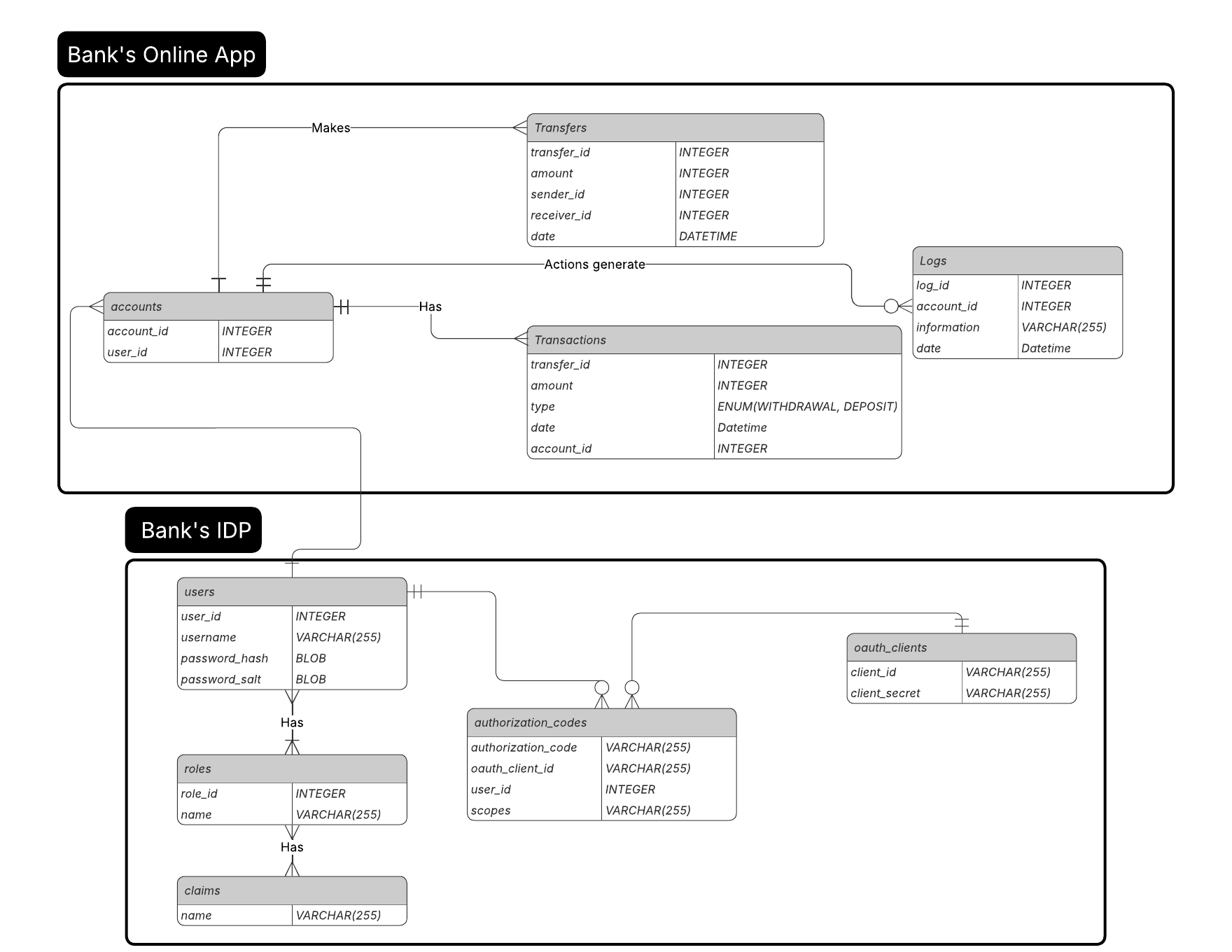
users: this is a simple entity it has an username a password_hash and a password_salt. In this database passwords are not saved as plain text, these are hashed using SHA256 this way in case of leak the passwords are not exposed, and also we save the password_salt which is a key to make users with the same password have different hashes. - >
roles: roles is a joined table which relate users with claims. A role has multiple claims, and a claim can be in multiple rows, finally an user can have multiple rows. This define what the user can do and not do in an application. - >
authorization_codes: An authorization code is a code that is emitted when an user wants an application (oauth_client) to have theiridentity token, for this reason the authorization code saves theuser_idandoauth_client_id, also the user can choose what access it wants the bearer to have using thescopesfield. - >
oauth_clients: this table saves all the applications registered to the identity provider, this application can get identity tokens, for this they register with aclient_idand aclient_secret.
Bank
- >
accounts: these are the bank accounts, theuser_idshould reference the user's id in theidp. - >
transfers: this table saves financial transfers between accounts. - >
transactions: this table keeps track of all the credit and debits made in a bank account. it has anamountfield and atypefield which can be either 'DEPOSIT' or 'WITHDRAWAL'. - >
logs: log everything an user does related to financial movements.
Relationships
IDP
Users can have multiple rows that can have multiple claims, this define what they can do in an application.
authorization_codes are codes that authorized applications can exchange by identity tokens, for this reason this table is related to the users table (the user who gave consent to an app to see their identity) and
the application who will bear the toke oauth_clients. An authorization code can only have one user and one oauth client.
Finally applications registered in the IDP are calld oauth_clients these must provide their client id and a client secret, with this client they can ask for identity tokens. These applications get an identity token
by exchaging an authorization code by an identity token, for this reason an oauth_client can have multiple authorization_codes.
BANK
Bank accounts are related to an user in the bank's idp, an user can have multiple bank accounts. These accounts can perform financial transactions such as deposits and withdrawals, and also they can transfer money to other accounts. Each financial movement made by an account is registered in the logs table.